
Google updated how it documents crawl limits for its indexing systems, particularly Googlebot and the broader crawler infrastructure. This is not a dramatic change in behavior, but the way Google now describes those limits has important implications for SEO professionals and site owners who want to ensure their content gets crawled and indexed effectively.
In this post we’ll break down what Google updated, how crawling limits work today, and practical takeaways for improving crawlability and overall SEO performance.
What Changed in Google’s Crawling Documentation
Google reorganized and clarified the documentation around file size limits that apply during crawling. Previously, limits were scattered across different help pages. Now, Google separates a default file size limit for Google’s crawler infrastructure from Search-specific limits defined on the Googlebot documentation page.
According to the updated help docs, Google’s crawling systems generally handle up to 15 MB of a file before stopping the crawl. Specifically for Google Search indexing, Googlebot will crawl the first 2 MB of supported HTML or text-based files. For PDFs, Googlebot will fetch up to 64 MB.
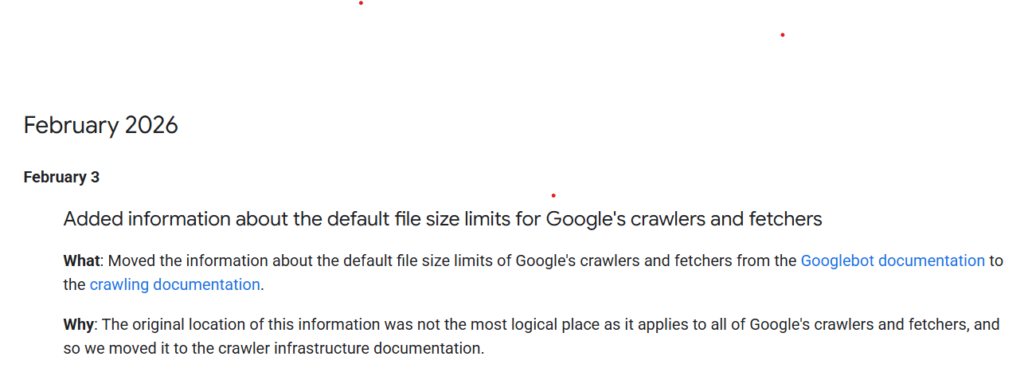
This reorganization wasn’t announced as a functional change in how Googlebot behaves. Google described it as a documentation clarification. Even so, wording changes matter because they shape how site owners interpret crawl budget and indexing behavior.
Crawl Limits Explained: Technical vs. Practical
These file size figures define how much content Googlebot actually processes from a page. That matters because anything beyond the limit may not be considered when Google evaluates the page.
General crawler limit (15 MB) applies across Google’s crawler infrastructure. It’s a broad cap on how much of a file Google’s systems will download in one request.
Search-specific limits (2 MB for HTML/text, 64 MB for PDFs) describe what Googlebot processes for Search indexing. Once these limits are reached, Googlebot typically stops the fetch and considers only the content it has already downloaded when evaluating the page for indexing and ranking.
Some SEO commentary points out that the 2 MB figure represents the portion of raw HTML Googlebot will process before deciding what the page is about. Anything beyond that may be ignored for ranking signals.
Why Most Sites Won’t Hit These Limits
Most websites will never approach a 2 MB HTML file size. Even complex pages usually remain well below that threshold.
HTML file sizes rarely exceed a few hundred KB unless there is significant inline code or poor optimization. Images, CSS, JavaScript, and media files are fetched separately, so they do not count toward the HTML crawl limit.
In practice, the 2 MB limit is large relative to typical HTML payloads. Still, bloated templates and heavy inline scripts can push pages closer to limits than necessary.
How Crawl Limits Interact With Crawlability
Crawl limits tie directly into crawlability, which is a core technical SEO concern. Crawlability describes how easily search engines can access and interpret your content.
If Googlebot can’t fetch or render your HTML due to errors, misconfigurations, or oversized pages, your pages may fail to index properly. Common issues include robots.txt blocking critical resources, slow server responses, timeouts, and HTML that includes unnecessary code bloat.
Even with generous limits, you want to ensure your HTML loads cleanly and efficiently, required CSS and JavaScript files are fetchable, and your most important content appears early in the source so Googlebot sees it well before any theoretical limits are reached.
XML sitemaps remain essential because they help Google discover pages and reduce the chance that important URLs are missed during crawl discovery.
Practical Takeaways for Website Owners
Keep your HTML clean and compact. Remove unused scripts, avoid excessive inline styles, and optimize templates.
Monitor crawl stats in Google Search Console. The Crawl Stats report shows how often Googlebot visits your site and whether it encounters errors or slow responses. If crawling appears constrained, investigate server capacity and availability.
Maintain proper robots.txt rules. Ensure critical resources needed for rendering are not blocked. Keep robots.txt simple and intentional.
Use sitemaps wisely. Maintain up-to-date XML sitemaps and follow size best practices for sitemap files.
What’s Not Changing
Google has indicated this update is largely organizational and clarifying rather than a radical shift in crawling behavior. Much of the information was already known within SEO circles, but it is now documented more clearly.
Ignoring crawl limits and crawlability can still hurt SEO performance, especially for large, complex sites with heavy dynamic content. The fundamentals remain the same: efficient servers, clean HTML, accessible resources, and strong site structure.
Why This Matters for SEO
Google continues to treat crawling as foundational infrastructure for Search and other products. Optimizing for crawl efficiency ensures your content can be discovered, rendered, and evaluated reliably.
The biggest gains come from server performance, page speed, clean site architecture, and consistent monitoring for crawl errors and availability issues. File size limits are one piece of a larger technical SEO puzzle.
SEO Action Checklist
- Review HTML file sizes and reduce unnecessary bloat
- Optimize site structure and internal linking
- Submit and maintain XML sitemaps
- Monitor crawl activity in Google Search Console
- Avoid blocking critical resources in robots.txt
- Fix broken pages and server timeouts promptly
FAQs
Does Google only crawl 2 MB of my pages now?
Googlebot processes up to 2 MB of supported HTML/text files for Search indexing. Most pages are far smaller, so this typically does not limit indexing in practice.
Does this mean Google indexes less content?
No. The limit affects how much of a file Googlebot processes in a single fetch. Efficient code ensures key content appears early and is fully considered.
Should I worry about CSS and JavaScript file sizes?
They are fetched separately from HTML, but optimizing them improves rendering and performance, which helps crawlability and user experience.
Is crawlability the same as indexing?
No. Crawlability is whether Googlebot can access your content. Indexing is whether Google includes that content in its searchable index. Both matter.
How can I see crawling issues?
Use Google Search Console’s Crawl Stats and URL Inspection to diagnose crawl errors, availability issues, and fetch problems.